
You have opted for a group registration, therefore in order to allocate the pass holder's names, we kindly ask you to
log into your account in our Group Portal.
You may log in with the email address you've provided for your registration.
Password: Please click on "forgot your password" and you will receive it by email:
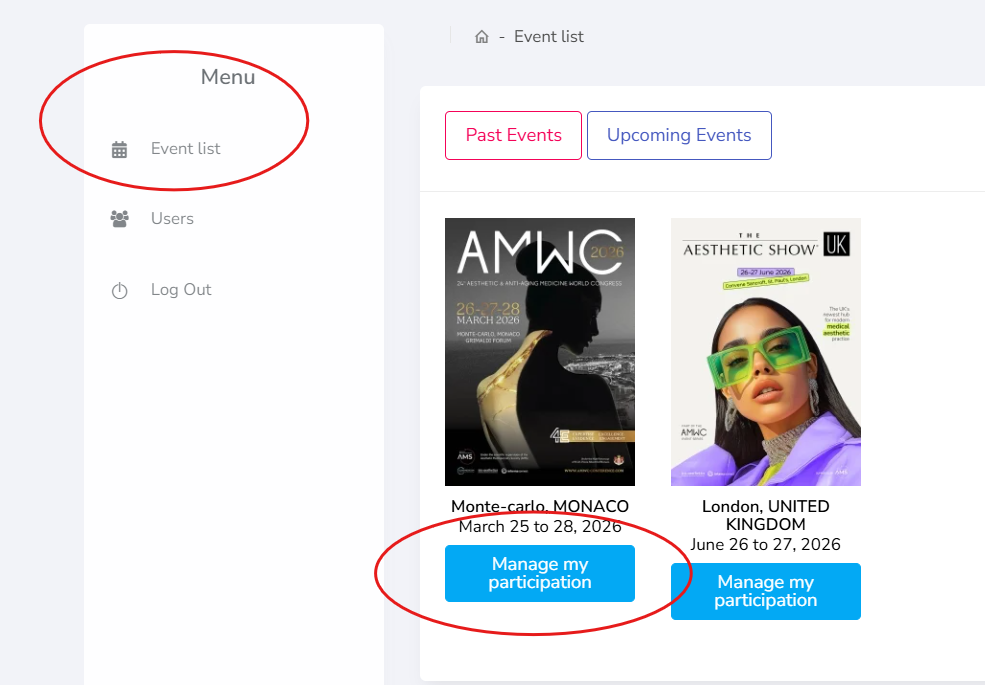
When you log into our Group Portal, please click on the corresponding event in our "Event list" and then click on "Manage my participation":
On the left side, you will see our option "Badges", and "Allocate badges":
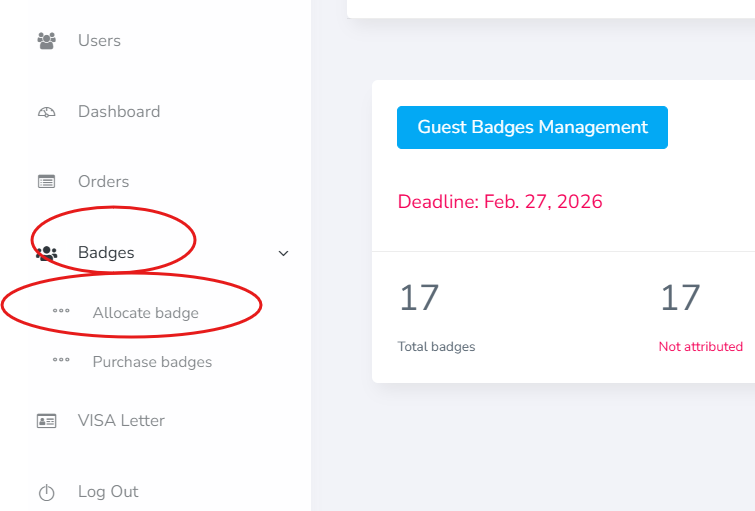
In order to allocate the names on the badges, you can either import them via our xlxs file or add the names manually.
Once done, you will be able to find your list of delegates under "Manage allocated badges section".
Under "Actions" you will be able to edit names, delete, request visa letters etc.
In order to obtain registration confirmations for your delegates, you will need to click on "green letter" icons as shown in the screenshot.
Each participant will then receive an individual link (via their provided emails) in which they will be asked to create a personal profile (provide name, email address medical specialty etc.), or log into an existing one if they have it.
This will take a few minutes, and once they complete all the fields, they will be able to download their registration confirmation:
We are looking forward to welcoming you at the conference.